

EVI

Everything a team needs to communicate. And everything that comes after.

EVI brings chats, calls and calendars into one app. EVI transcribes what is discussed there and reminds you at the right time of what you committed to.

01 Messages and groups

One place for every conversation in your team.

Message one person directly or the whole group. Replies stay on topic in threads, and a mention gets your message to exactly the people who should read it.
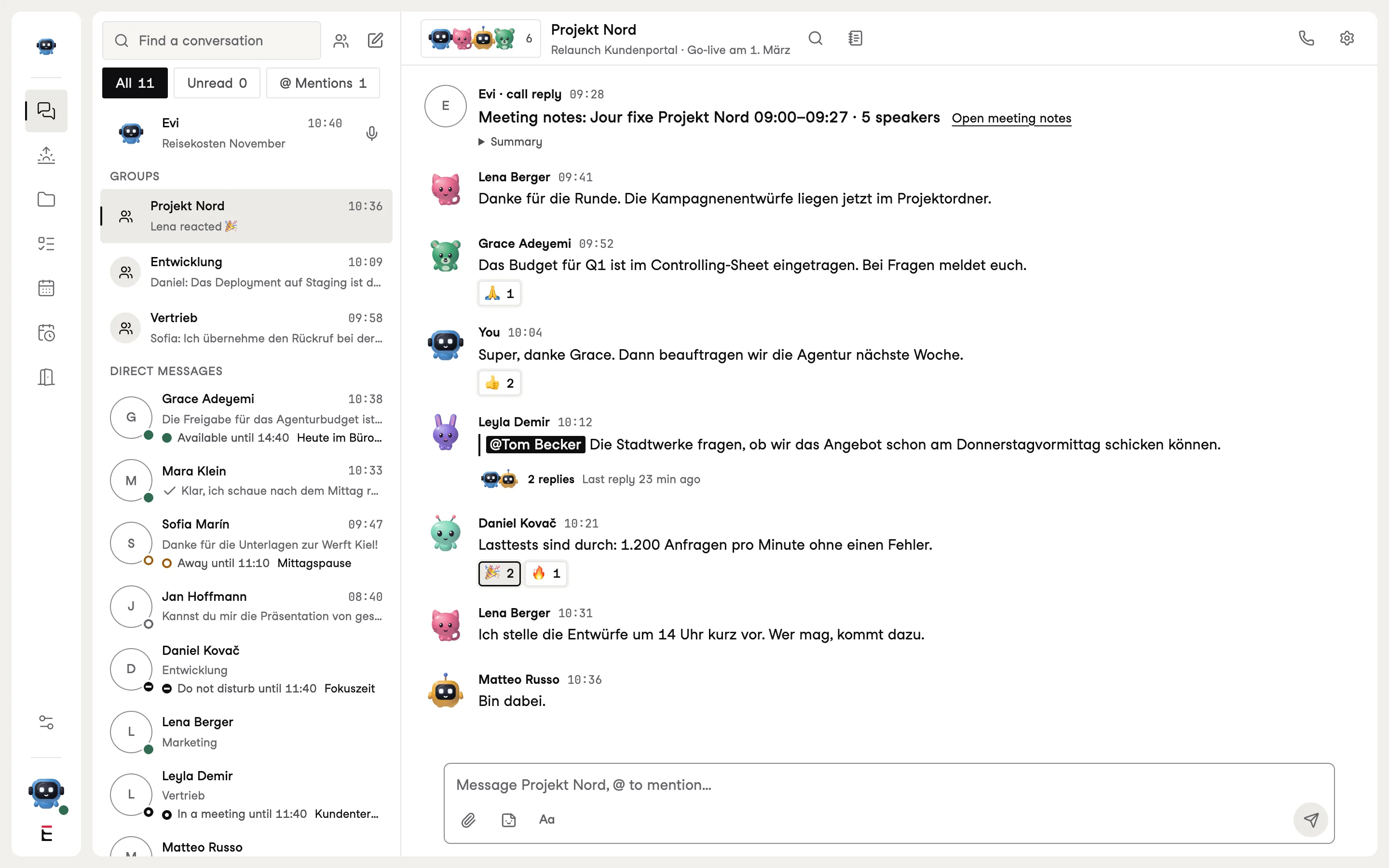
The Projekt Nord group in EVI with messages, a thread and colleagues’ status
The Projekt Nord group. Sample data.
  • Direct and in groupsWith a group topic, threads and reactions. You can see who is typing.
  • MentionsIndividual people, everyone in the group, or only those who are around right now.
  • Videos and filesVideos up to 200 MB go straight into the message and play instantly.
  • Status by the nameNext to every conversation you can see whether the person is available, on a call or away.
  • Quiet in meetingsWhile you are on a call or in an appointment, messages arrive but notifications wait.
  • A summary afterwardsOnce the meeting is over, EVI shows you once what came in meanwhile.

02 Audio and video calls

From chat to call. In one click.

Every conversation has its own call. Share your screen, invite colleagues, or send guests a link they can use to join once you let them in.
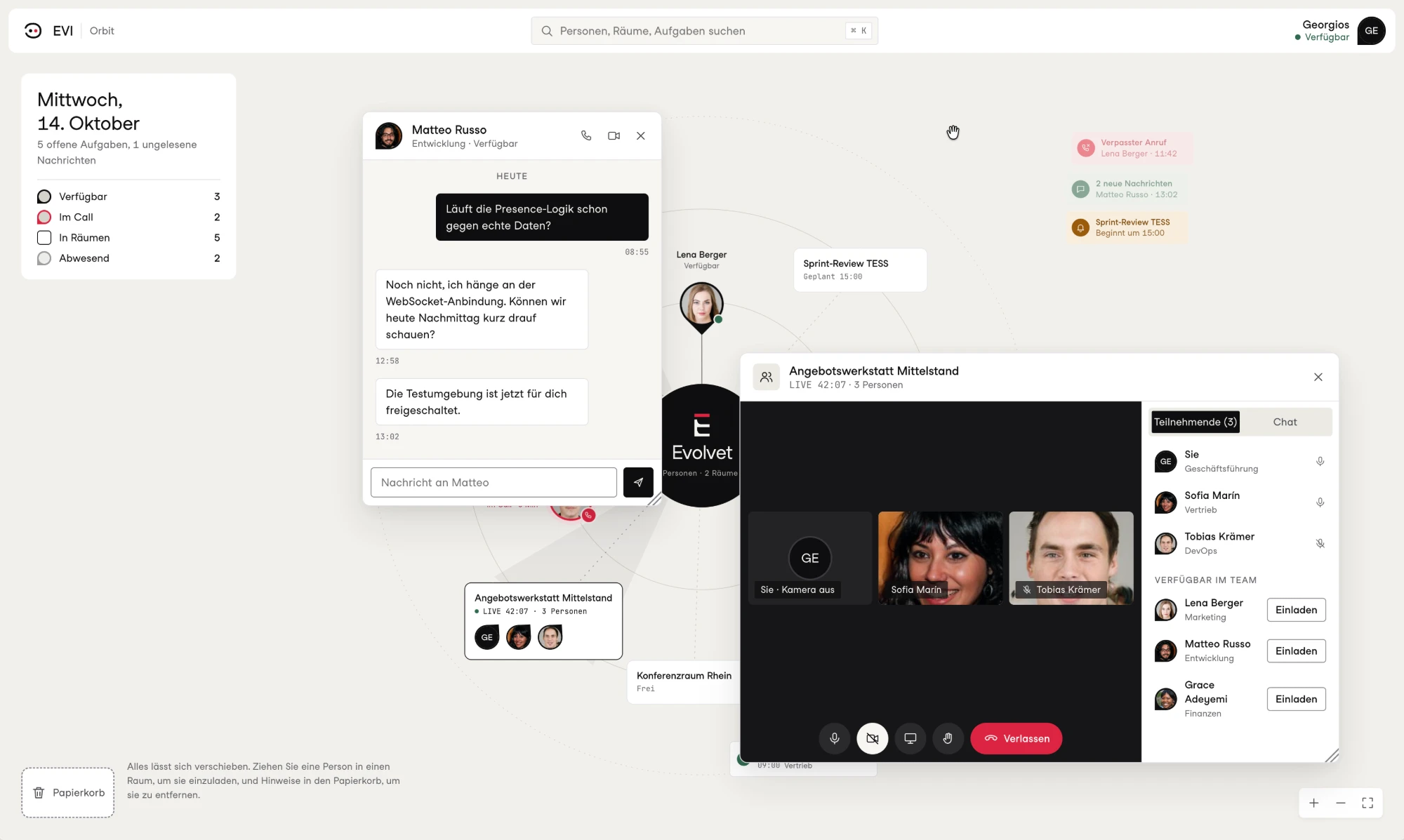
A video call in EVI with participants and the list of available colleagues
A call with an invitation from the team. Sample data.
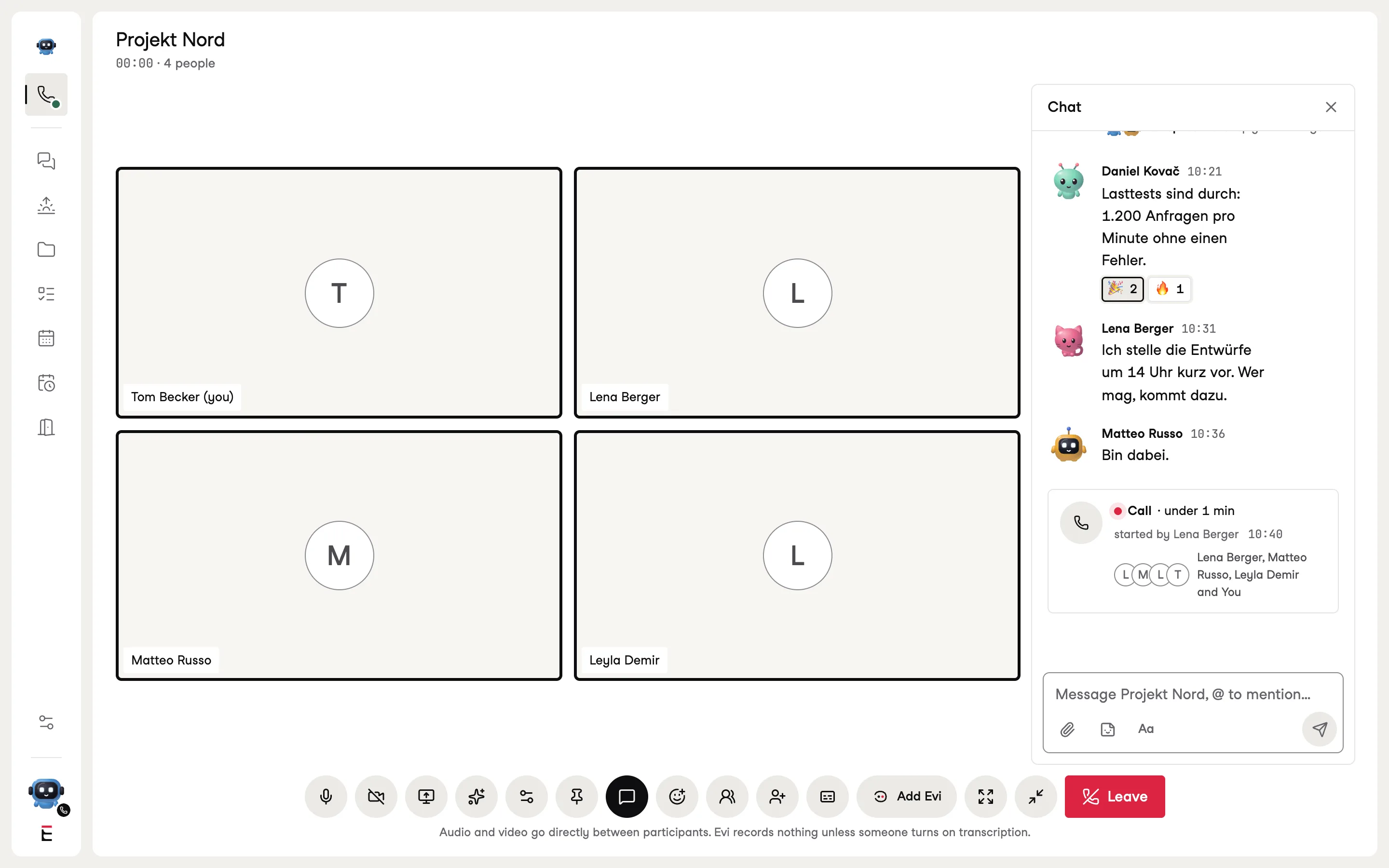
A call in the Projekt Nord group with four participants and the chat beside it
A call in the Projekt Nord group, with the chat still open beside it. Sample data.
  • Audio, video, screenIn conversations, groups and rooms, in the browser and in the apps.
  • Guests by linkGuests wait in a lobby until someone lets them in. They can hear, see and speak, nothing more.
  • RoomsPermanent rooms for teams and appointments. Everyone can see in the Orbit who is inside.

03 Transcripts and meeting notes

After the call, it is clear who said what.

EVI transcribes every call and attributes each sentence to the person who said it. Afterwards a summary appears in the call’s chat, and the full notes are kept where only participants can open them.
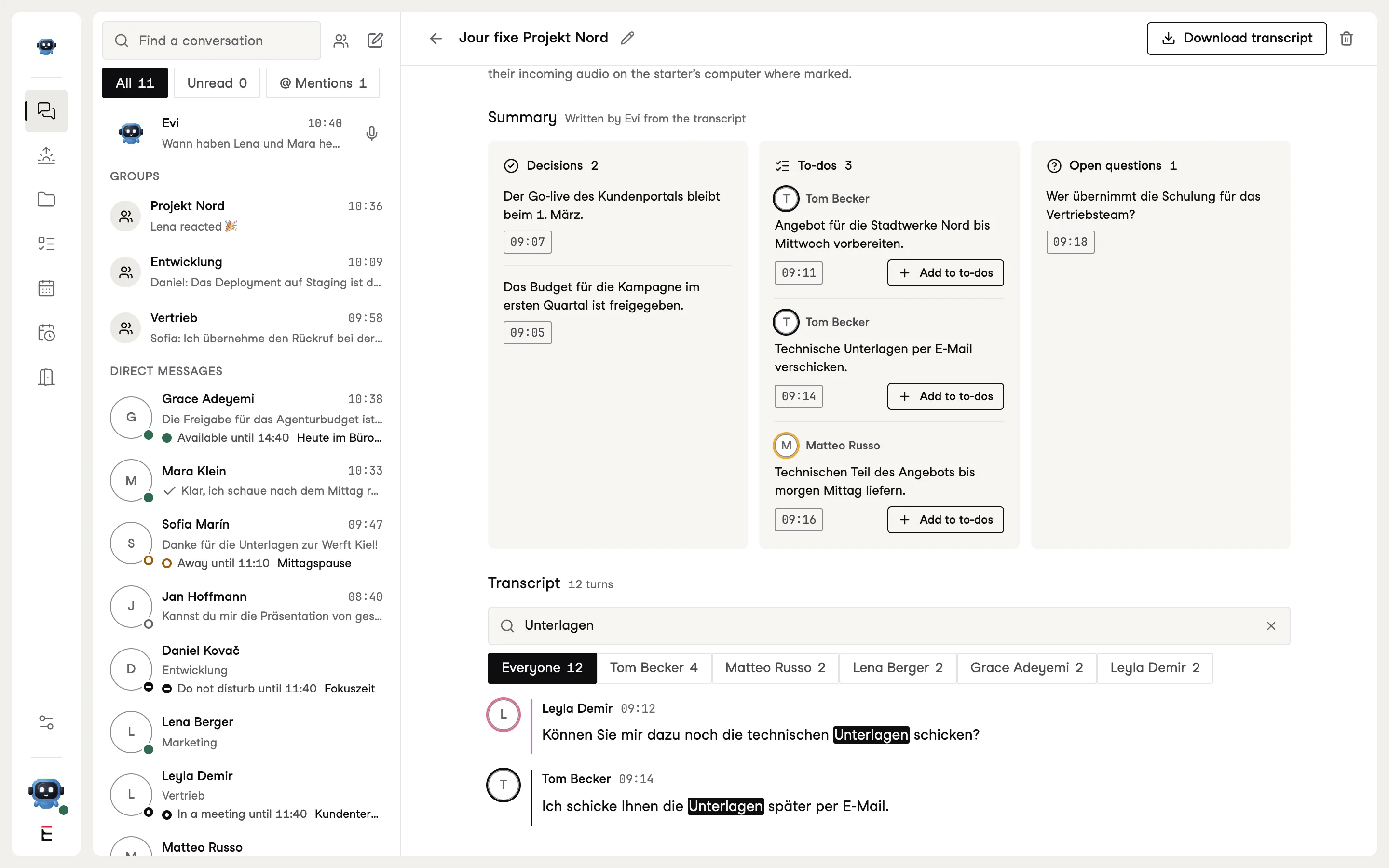
Meeting notes in EVI with a summary and the participants’ contributions
Notes from the Projekt Nord weekly meeting. Sample data.
  • Visible to everyoneAs soon as transcription starts, everyone on the call can see it. Anyone who joins later gets the same notice.
  • Summary in the chatA short message with the outcomes and a link to the notes, never the whole transcript.
  • In NEVA, if you use itWith NEVA, every transcript goes into your knowledge base, where it can be searched.

04 Commitment reminders

What you commit to in a meeting comes back in time.

Say “I’ll send you the documents later” on a call, and EVI turns it into a task with a reminder. No clicks, and nobody has to take minutes.

Call Project North, 10:12, Tom Becker“I’ll email you the documents later.”

EVI spots the commitment

16:00In the chat with EVI

Email the Project North documents to Lena

DoneRemind me later
  • Only your own wordEVI only creates tasks you committed to yourself. What others decide for you remains a question.
  • Time from what was said“By tomorrow morning” becomes a reminder in the morning. If the time is unclear, EVI asks instead of guessing.
  • Done or laterThe reminder arrives in your chat with EVI. One click ticks it off or postpones it.

“EVI pays close attention to who commits to what. Only the person who said ‘I’ll take care of it’ gets the reminder.”

Aditya Raj TiwariArchitecture and Artificial Intelligence, Evolvet

05 Morning Brief

Every morning, one page with what matters today.

Overnight, EVI reads your projects in Notion and the to-dos from your meetings and writes a short report. It is ready when you open EVI in the morning.
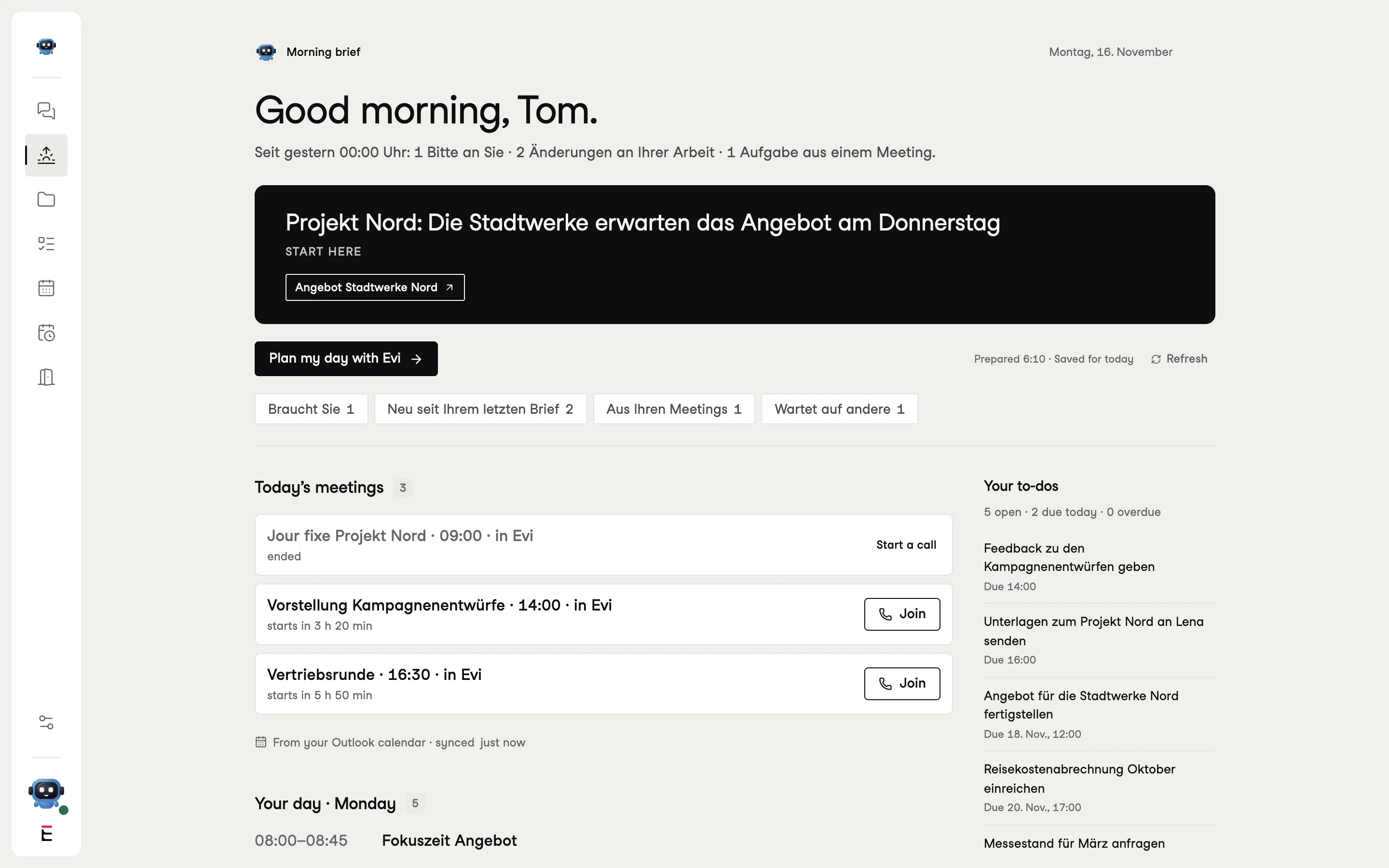
The Morning Brief in EVI with the key points of the day and their sources
Tom’s Morning Brief. Sample data.
  • With sourcesEvery statement links to the page or meeting it came from.
  • Only your areaThe brief covers your projects and your tasks, not everything happening in the company.
  • Prepared in the backgroundNo waiting when you open it. A new report is only written when something has changed.

06 Orbit

The whole company at a glance.

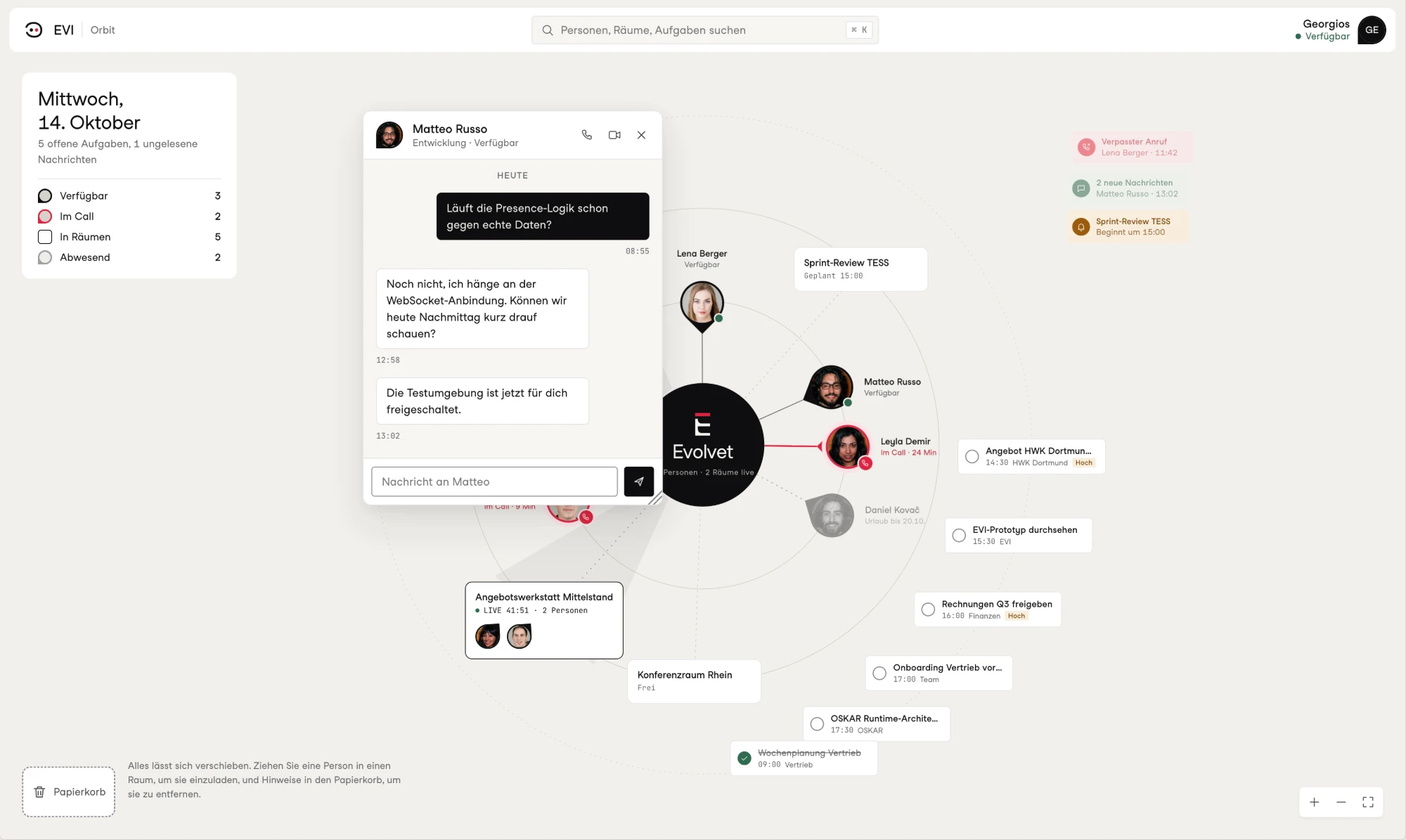
The Orbit arranges everyone who works with you around a centre: who is available, who is on a call and who is away. Plus the active rooms, your groups and your tasks for today. Click a person to open the chat.
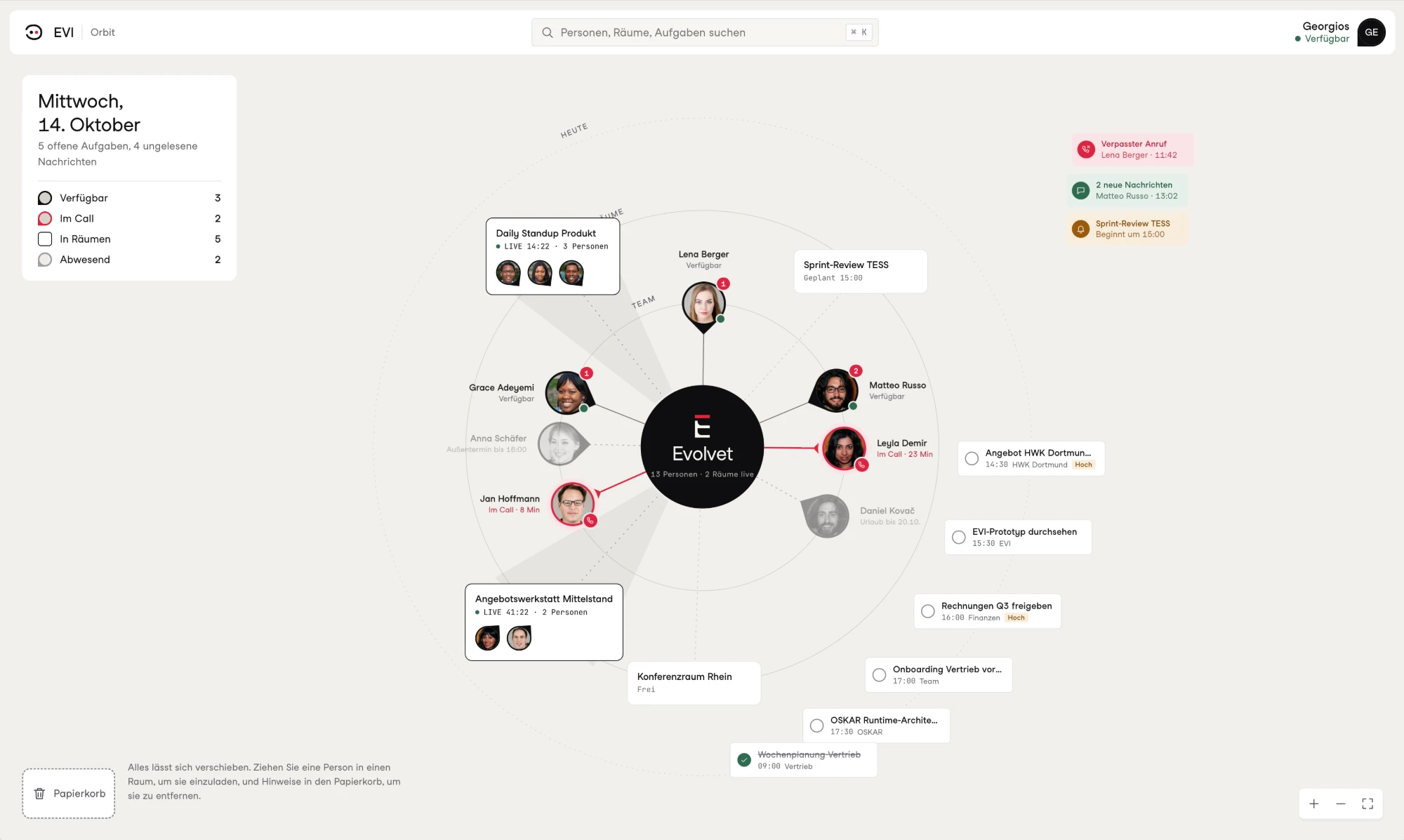
The Orbit in EVI with people, their status, rooms and tasks
The Orbit on a Wednesday afternoon. Sample data.
A chat with Matteo, opened straight from the Orbit
A chat, opened straight from the Orbit.
  • Status at a glanceAvailable, on a call, in a room or away, with a return date during holidays.
  • Rooms and tasksActive calls with their duration and participants, plus your tasks for the day with their times.
  • Drag instead of searchDrag a person into a room to invite them.

“In the Orbit I can see who is on a call right now. So I send a quick message instead of interrupting the conversation.”

Nadia TrabelsiArchitecture and Workshops, Evolvet

07 Calendar, Outlook and Notion

Your calendar, your pages and your colleagues in one view.

EVI shows your Outlook calendar together with your meetings in EVI. Ask when colleagues have time, and EVI suggests a free slot that you confirm with one click.
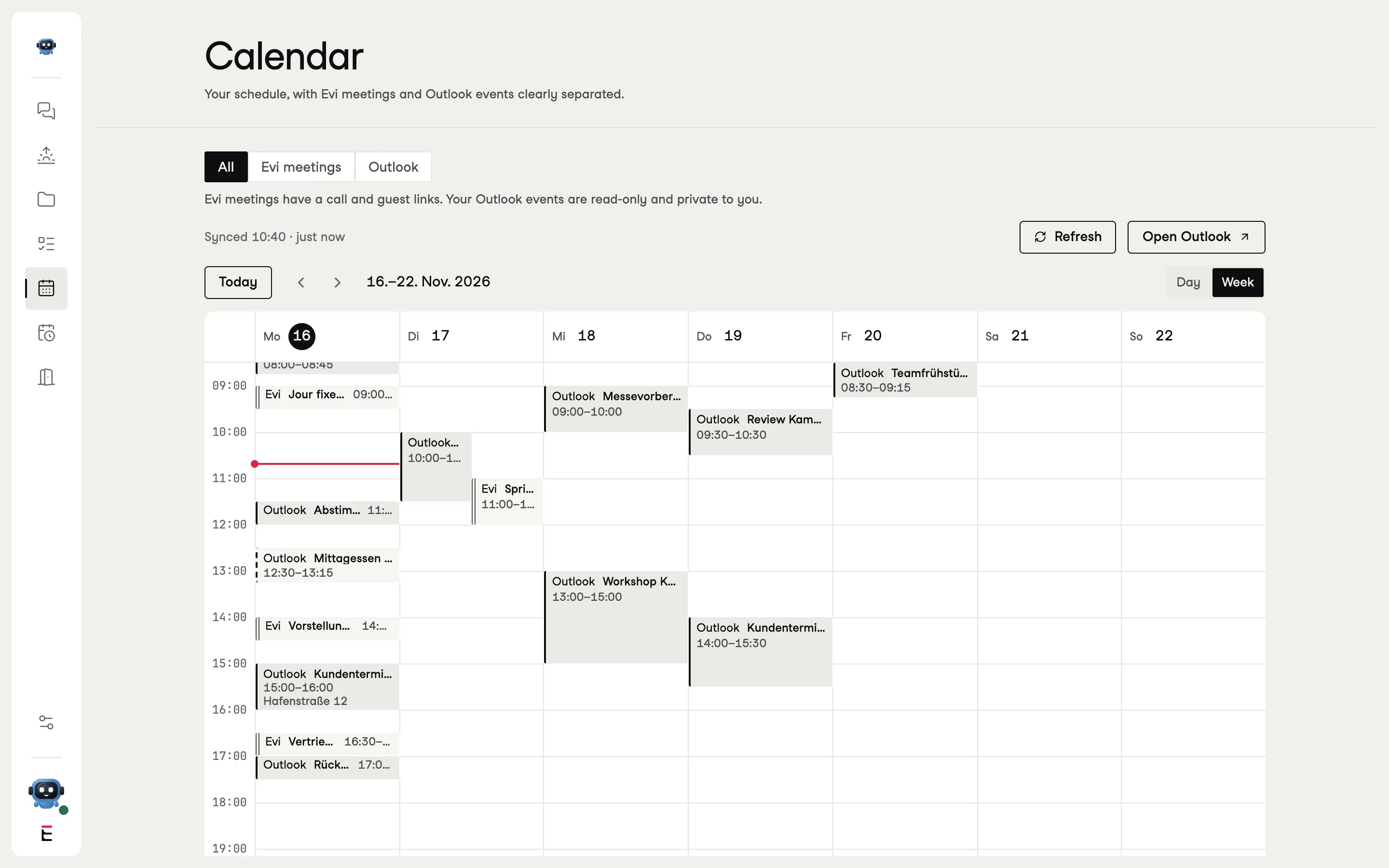
The calendar in EVI with appointments from Outlook and meetings from EVI
The calendar with Outlook and meetings from EVI. Sample data.
  • OutlookYour calendar in EVI, your colleagues’ free times, and your inbox opened with a single word. For others, EVI only sees free or busy.
  • NotionAnswers from your pages, always with a link to the source. EVI only reads and never changes anything.
  • MeetingsOne-off or recurring, for individuals or a whole group. If you are running late, tell EVI and everyone knows.

08 EVI on the team

A colleague who listens and looks things up.

EVI sits in your list like a colleague. She answers questions about your projects, finds free times, drafts messages and sets up meetings. You always decide and send.
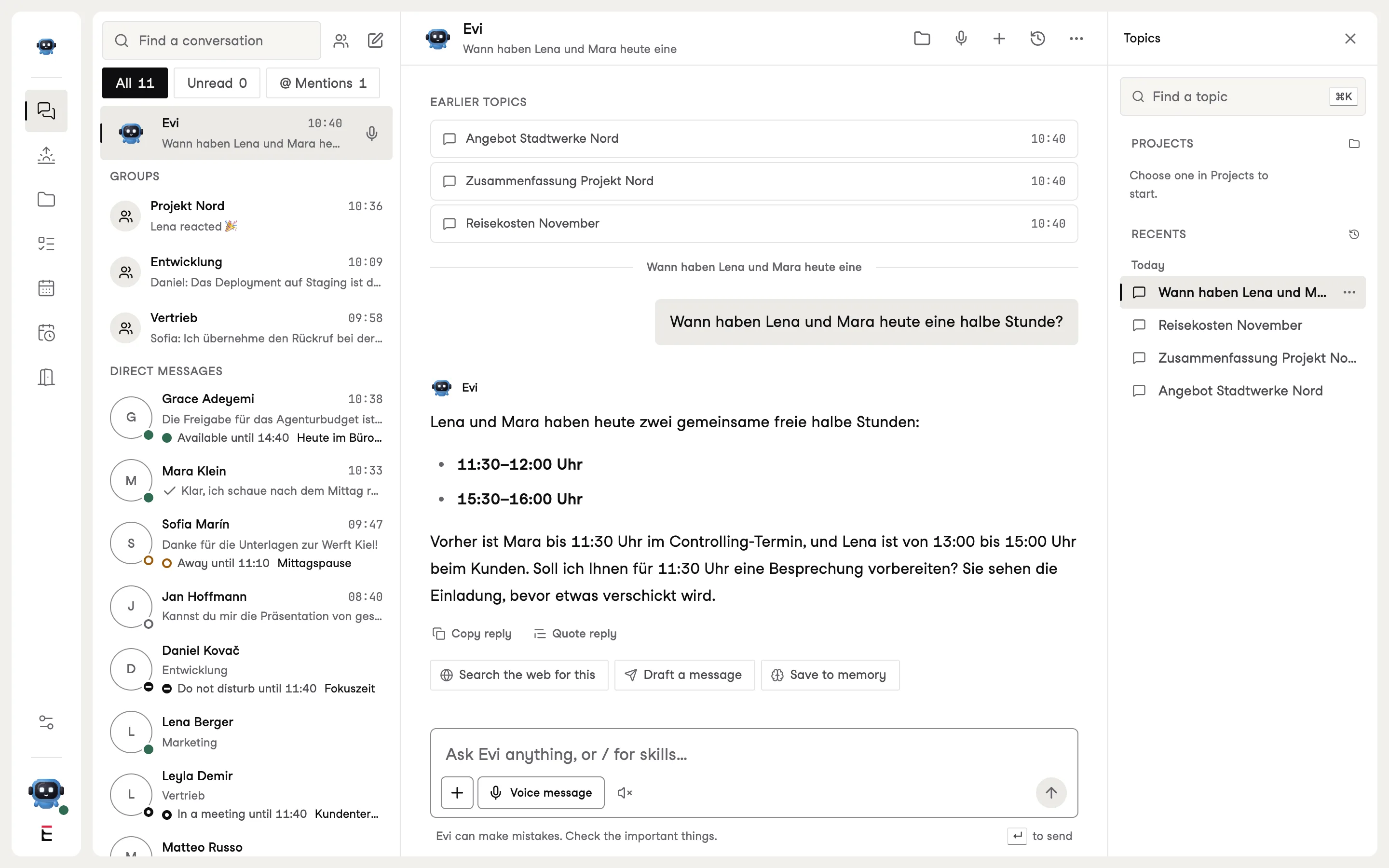
The chat with EVI, with a question about free times and EVI’s answer
Tom asks EVI for a time that suits everyone. Sample data.
  • In groups with @EVIIn a group, EVI answers for everyone to see and never uses anyone else’s private data.
  • By voiceVoice messages to EVI become text. By voice, EVI only sets up a meeting after you say yes.
  • With evidenceAnswers from Notion or the web carry their sources so you can check them.

09 Apps

The same state on every device.

EVI runs in the browser and as an app for iOS, Android, macOS and Windows. One account is all you need, and every device shows the same conversations, calls and tasks.
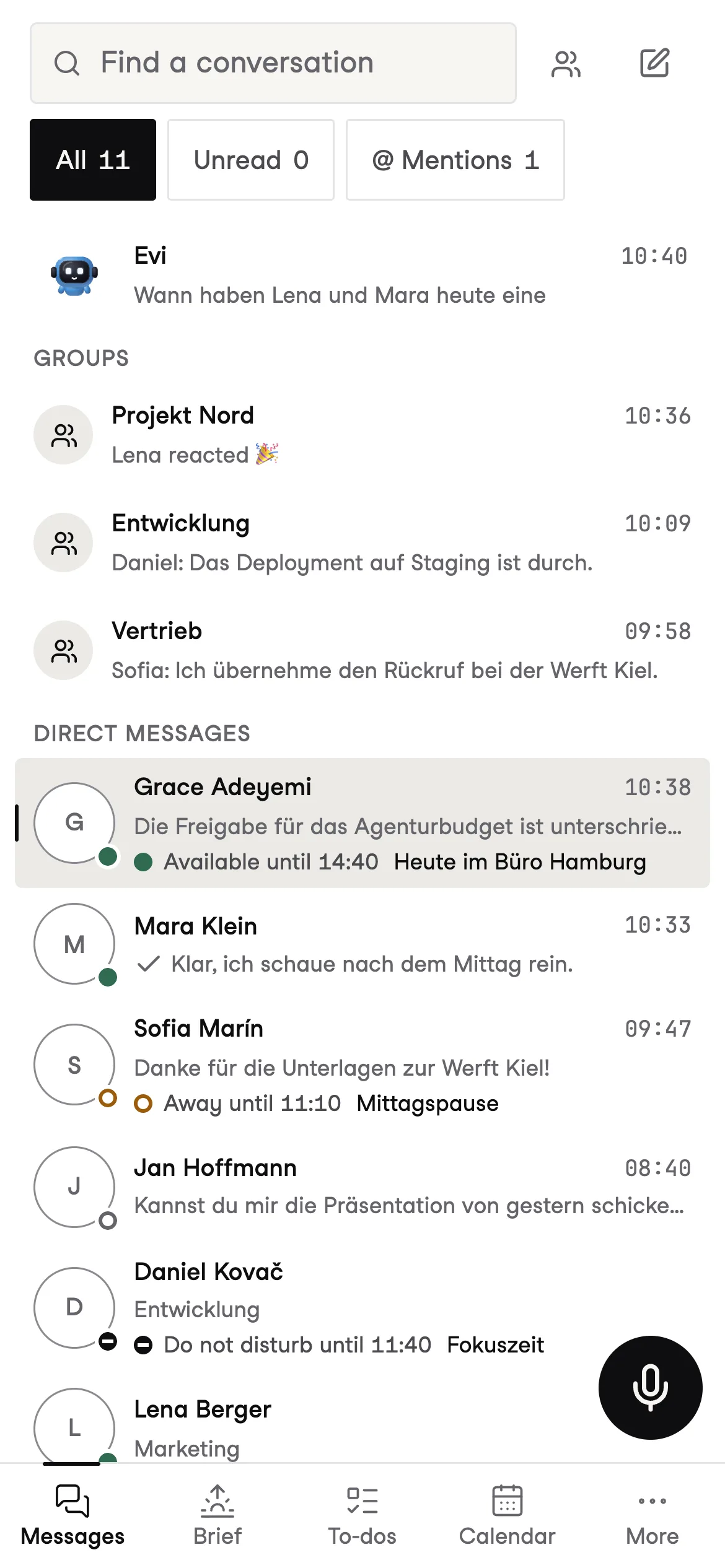
EVI on a phone with the list of conversations
EVI on a phone. Sample data.
  • PhoneNotifications with previews, encrypted for your device. Apple and Google cannot see the content.
  • DesktopIn the macOS and Windows app, the transcript is created on your computer. Only the text travels over the network.
  • BrowserNo installation, with the same features and notifications.

See EVI on a real call.

In thirty minutes we show you chats, calls and transcripts. By the end, your first reminder is already waiting.